

Your Premier Source for Blind & Low Vision Access News
| Email: PASS1@AccessiblePass.net | Website: accessiblepass.net |
Welcome to Edition 33
Welcome to the Paschall Power Newsletter — your trusted, community-driven source for news, technology, and inspiration crafted specifically for the blind and low vision community. Each edition, we hand-pick the stories that matter most to your accessible and digital journey — from the latest screen reader updates and AI breakthroughs to cultural highlights, empowering profiles, and practical tools that make everyday life richer and more independent.
Quick Accessible Fact
Did you know? The first official screen reader for Windows was SlimWare Window Bridge, released by Syntha-Voice Computers in 1992 for Windows 3.1!
Accessibility Note
Reading with a screen reader? Activate your “Say All” or “Read All” command to enjoy this newsletter completely hands-free — including all accessible image descriptions and labeled content. You can also press your Headings navigation key (H on most screen readers) to jump quickly between articles and sections
Inspiration Corner — Quote of the Month
August 2026 Edition
This month’s inspiration comes from a voice close to home — Mr. Jason Miller, Owner, and Director of Paschall Access Solutions. Jason leads with purpose, innovation, passion, and a deep commitment to empowering the blind and low vision community through accessible technology training, education, and advocacy.
“Even though we attempt to keep our lives under fertile soil, sometimes the soil can get muddy, sun scorched and difficult for growth — in that case, ‘turn over the soil,’ and regrow and reconstruct your life.” Jason A. Miller
Now, let us get into the news. August 2026 starts here.
Coloratura: Designing a World Where Sound Is the Only Guide
Paschall Power Newsletter — Gaming & Entertainment Feature

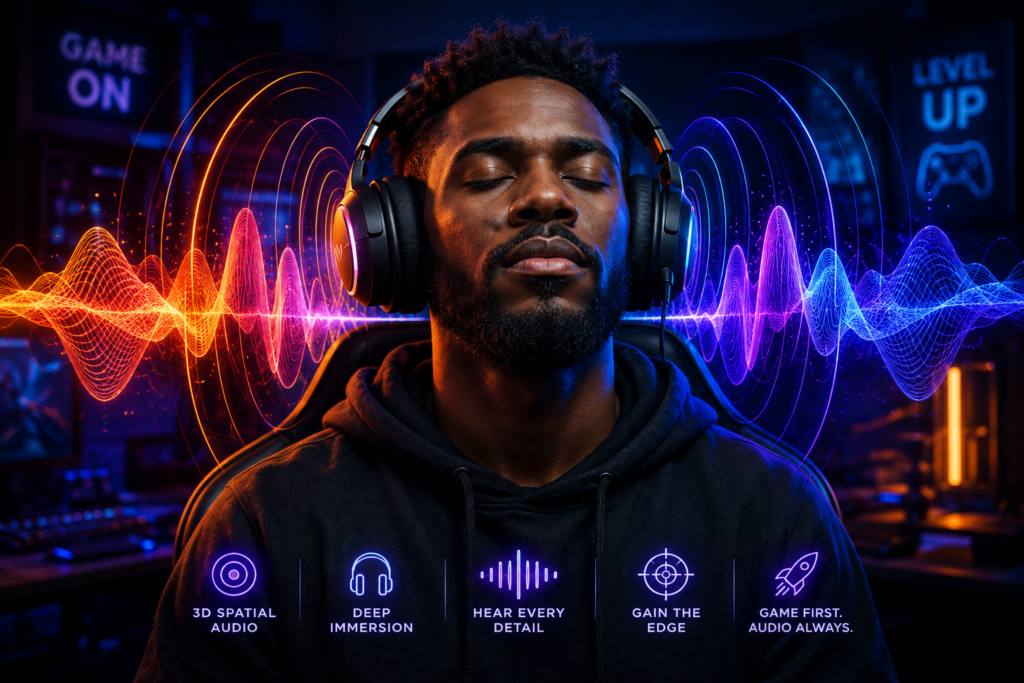
Let’s be honest — most video games hand you a map, a minimal, a waypoint arrow, a glowing trail, and still somehow manage to get you lost. Coloratura throws all of that out the window. No map. No waypoints. No visual HUD. Just you, a pair of headphones, and the most immersive 3D audio experience to arrive on the PlayStation 5. And the remarkable part? That is not a limitation. That is the entire point. Developed by Nakama Game Studio and published internationally by Dojo System, Coloratura is a narrative adventure game built from the ground up around one revolutionary premise: sound is not a supplement to the experience — sound is the experience. Scheduled for full release on PC and PlayStation 5 in October 2026, with a public Steam demo already available as of June 15, 2026, this game is turning heads across the gaming world — and for good reason.
The Story: Alex’s Journey Through Sound and Memory
You play Alex, a talented young musician who has lost her sight following an accident. Rather than framing this as tragedy, Coloratura frames it as transformation. Alex’s world does not go dark — it goes deeper. The game takes players through her memories, emotions, and personal milestones, each rendered as a distinct sonic environment that reflects her inner state. Each chapter of Alex’s story is also a movement in a symphony she is building. As you solve puzzles and navigate her memories, you are composing her life’s soundtrack — one resolved challenge at a time. By the end of the game, the music you have assembled reflects every emotional turn of her journey. It is storytelling through sound in a way that no game has attempted quite like this before.
How the Gameplay Works: Your Ears Are the Controller
Navigation in Coloratura is built entirely around 3D binaural audio. Players move through fully three-dimensional environments by listening — tracking the direction, distance, and rhythm of sound cues to build a mental map of each space. There are no cardinal boundaries, no invisible walls boxing you in. The team specifically engineered broad, fluid environments so that movement feels natural and unobstructed.
Three core mechanics power the experience:
- Radar and Memory System: Alex can concentrate on sensing objects at varying distances. Once discovered, each object — a table, a coffee machine, a doorway — is assigned to a positional sound that persists in the environment. This allows players to build and retain a mental map of each space as they explore, rewarding careful listening with a richer, more navigable world.
- The Objective Bell: Instead of a visual waypoint arrow, the game uses a distinct bell sound to indicate the direction of your next objective. It is a beautifully simple solution — the kind that makes you wonder why more games have not done it. Press the objective button, hear the bell, follow the sound. Clean, intuitive, and completely accessible.
- Musical Puzzles: Each puzzle asks you to locate and interact with specific sound sources in the environment. Solving them does not just advance the story — it adds a new layer to Alex’s evolving symphony. The acoustic guitar represents her consciousness, present-day self; piano tones evoke her more introspective and dreamlike memories. The music tells you where you are emotionally, not just physically.
The PS5 version takes full advantage of the console’s advanced 3D audio hardware, and the game is fully compatible with the PlayStation Access controller — Sony’s adaptive controller designed for players with disabilities. The Dual Sense wireless controller’s haptic vibration also adds a tactile layer to key audio moments, giving players an additional sensory channel beyond sound alone.
The Audio Sports Gaming Frontier Is Opening Up
Narrative adventure games are not the only genre making moves in the accessible gaming space. Sports gaming — long considered one of the most visually dependent categories in all of gaming — is beginning to open its doors in a meaningful way. Right here in our own community, High Power Football has been leading the charge — an audio sports game designed specifically so that the gridiron experience is fully accessible, no screen required. The game puts the action in your ears, letting you call plays, read the field through sound, and feel the momentum of the game without a single pixel of visual dependency. It is the kind of innovation that the Paschall Power Newsletter team has been proud to follow and support. And now, the court is calling. High Power Basketball is on the horizon — bringing that same audio-first sports gaming philosophy to the hardwood. The anticipation in the community is real, and for good reason. If High Power Football proved that accessible sports gaming could be genuinely exciting and competitive, High-Power Basketball is poised to take that energy to the next level. The broader sports world is also paying attention. Companies like OneCourt are partnering with NBA teams — including the Atlanta Hawks, Sacramento Kings, and Portland Trail Blazers — to bring haptic tablet technology to live games, allowing fans to literally feel the action through vibration patterns. The American Council of the Blind has partnered with OneCourt to bring this technology home for members. Sports and accessibility are no longer strangers.
- Activate the following link for more about Coloratura on the PlayStation Blog💡
Coloratura: Designing a world where sound is the only guide — PlayStation Blog
Be My Eyes Comes to Mac — and the Workplace Just Got a Whole Lot More Accessible
Paschall Power Newsletter — Technology & Independence Feature

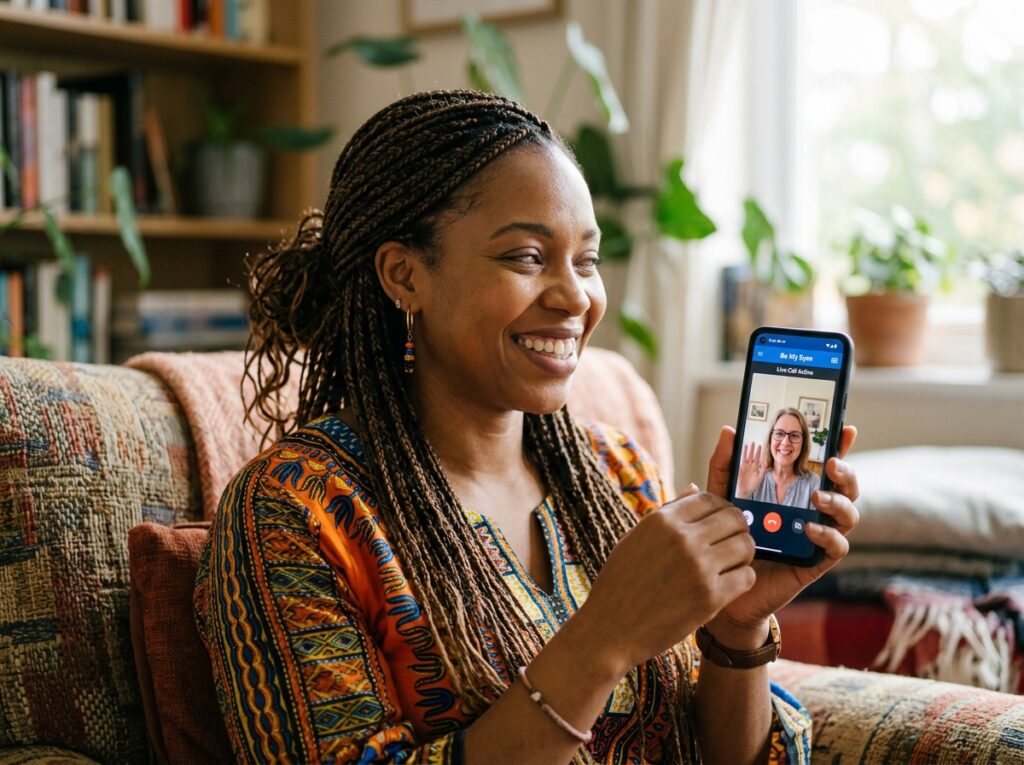
If you have ever sat at a Mac and wished your computer could just tell you what it is looking at — a confusing dashboard, an inaccessible PDF, a screen layout that your screen reader cannot quite crack — that wish just became a reality. Be My Eyes has officially arrived on macOS, and it brought its workplace edition along for the ride. On July 6, 2026, at the National Federation of the Blind Annual Convention in Austin, Texas, Be My Eyes announced the expansion of its desktop platform to Apple macOS — launching both Be My Eyes for Mac and Be My Eyes Workplace for macOS. Together with the existing Windows applications, this completes the Be My Eyes desktop family — delivering AI-powered visual assistance across the two most widely used desktop operating systems on the planet.
What Be My Eyes?
For those newer to the tool, Be My Eyes is one of the most powerful and widely used visual assistance platforms available to the blind and low vision community. With one million users worldwide, it combines two distinct capabilities into one application.
The two pillars of Be My Eyes:
- AI-Powered Visual Assistance: The app uses advanced computer vision and conversational AI to describe what is on your screen, interpret images, read documents, explain complex layouts, and answer questions about visual content — all in real time, without waiting for a human.
- Live Agent Support: When you need a human perspective, Be My Eyes connects you via live video call to a trained sighted volunteer or a specialist from a participating company. That person sees exactly what your camera sees and guides you through whatever you need — reading a label, navigating a space, troubleshooting a device, or completing a task.
On mobile, Be My Eyes has long been a go-to tool for everyday tasks — reading mail, identifying products, navigating unfamiliar environments. The Mac launch brings that same power to the desktop, where so much modern work and personal computing happen.
Be My Eyes for Mac — Free for Personal Use
Be My Eyes for Mac is available free of charge for personal use, effective immediately. It is designed to work natively with VoiceOver, the screen reader built into macOS, making it a natural fit for the Apple accessibility ecosystem that many in this community already rely on.
What you can do with Be My Eyes for Mac:
- Ask questions about what is on your screen — application interfaces, web page layouts, menus, and more
- Get detailed descriptions of local and online images — from family photos to news graphics
- Review documents and files with real-time descriptions of text and embedded images
- Prepare for video calls — use your Mac’s built-in or connected webcam to check your framing, lighting, and appearance before joining a meeting
The app supports both Apple Silicon and Intel Macs, installs via a direct download from the Be My Eyes website, and updates automatically when restarted. Setup is straightforward — download the .dmg file, drag it to your Applications folder, sign in, or create an account, and you are ready.
Be My Eyes Workplace — Independence at Work
The workplace edition is where things get particularly significant. Be My Eyes Workplace for macOS is designed specifically for professional environments — and it addresses one of the most persistent challenges in accessible employment: the gap between what a screen reader can manage and what a modern workplace demands. Complex dashboards, inaccessible PDFs, proprietary business software, visual workflows, charts, and data-heavy documents — these are the everyday realities of professional computing, and they do not always play nicely with screen readers alone. Be My Eyes Workplace steps in as a complement to existing access technology, providing AI-powered interpretation and real-time human support directly within the desktop workflow.
Workplace features include:
- Interpretation of complex dashboards, charts, and business documents
- Navigation assistance for inaccessible workplace applications and digital workflows
- Real-time human support from trained colleagues and specialists
- Enterprise-grade security, privacy controls, and centralized IT deployment
- Consistent experience across both Windows and Mac in mixed-device organizations
“Desktop computing remains at the center of how people work, create, and communicate,” said Mike Buckley, CEO of Be My Eyes. “By bringing both our free consumer experience and our enterprise solution to macOS, we’re ensuring that blind and low vision users don’t have to choose between their preferred platform and accessible, AI-powered visual assistance.”
Be My Eyes on Meta Ray-Ban Glasses — Hands-Free and Voice-Activated
The Mac launch is the latest chapter in Be My Eyes’ expanding reach — but it is worth noting that the platform has also been making major moves in the wearable space. Earlier in 2026, Be My Eyes and Meta announced an expanded partnership that brings hands-free visual assistance directly to Ray-Ban Meta and Oakley Meta AI glasses.
Users can now activate Be My Eyes entirely by voice — no phone required. Simply say “Hey Meta, Be My Eyes with [name or company]” and the glasses connect you to a trusted contact from your private group, or directly to a trained service representative from a participating brand. Companies including Hilton, Tesco, Sony, Amtrak, and others are already part of the Be My Eyes Service Directory, meaning users can get real-time visual help from brand specialists — hands-free, in the moment, wherever they are. This is what the Paschall Power Newsletter team has been watching closely: the convergence of AI, wearable technology, and human support into a single, seamless experience. Be My Eyes is no longer just an app — it is becoming an accessibility platform that travels with you, works with you, and now, sits on your desktop waiting to help.
- Activate the links below, for more about (Be My Eyes/Workplace & more,”💡
bemyeyes.com/be-my-eyes-for-desktop
Be My Eyes Workplace for Mac (enterprise):
The Carina C2: The Magnetic Battery Pod That Gives Your Meta Ray-Ban Glasses a Second Wind
Paschall Power Newsletter — Accessible Technology & Wearables Feature
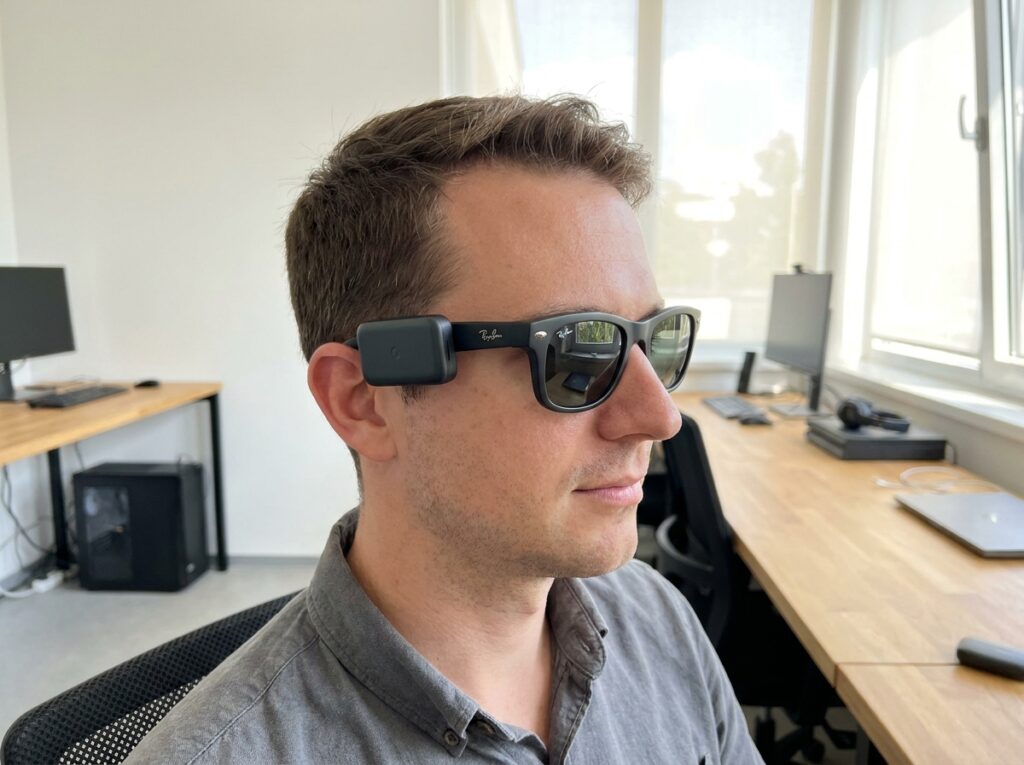
Here is a scenario that will sound familiar to anyone who wears Meta Ray-Ban smart glasses as part of their daily routine: you are in the middle of something important — navigating a new location, getting a live description of something in front of you, listening to audio through your frames — and then the battery dies. Two to three hours on Gen 1. Five on Gen 2. For a device that is supposed to be your eyes, which is a short runway. PrismXR has a direct answer to that problem, and it snaps right onto your frames. The Carina C2 magnetic battery pod is a wearable power system designed specifically for Meta Ray-Ban smart glasses — Gen 1 and Gen 2 — that extends your battery life without adding bulk, without removing your glasses, and without interrupting what you are doing.
How It Works: Magnetic, Hot-Swappable, and Seamless
The Carina C2 uses a magnetic attachment system that connects directly to the frame of your Ray-Ban Meta glasses. The pod clicks into place securely, sits low-profile against the frame, and begins delivering power immediately — no cables dangling, no case to carry, no interruption to your session. The hot-swap design is the key feature here. When one pod runs low, you pull it off and snap a fully charged replacement on — in seconds, while the glasses are still on your face. For users who depend on their glasses throughout the day, this eliminates the single biggest frustration of smart glasses ownership: the forced break. The power delivery is engineered to be safe and intelligent. The Carina C2 outputs a clean, regulated 5V stream to the glasses’ charging contacts — no voltage spikes, no power surges. The glasses’ own internal Battery Management System (BMS) controls exactly how much power is drawn, splitting incoming energy between running active features like AI processing and audio, and gently topping up the internal battery. The glasses are always in control. The C2 is simply the reservoir. During rigorous stress testing, the Carina C2 kept operating temperatures safely under 40 degrees Celsius — the warmth of a coffee cup that has been sitting on your desk for twenty minutes. Well within safe parameters for daily use.
Design, Durability, and Who Benefits Most
The Carina C2 was designed to complement the sleek aesthetic of the Ray-Ban Meta frames, not fight against it. The pod is slim, lightweight, and low-profile — it integrates with the frame rather than hanging off it. For users who care about how their glasses look and feel in public, this matters. Durability is also a genuine strength. The pods are built to withstand the demands of an active lifestyle — including accidental water exposure. For users who wear their glasses commuting, working, traveling, or outdoors, the Carina C2 is built to keep up.
Who benefits most from the Carina C2:
- Gen 1 Ray-Ban Meta users who get only 2 to 3 hours per charge and are not ready to upgrade their frames
- Gen 2 users who need all-day power beyond the standard 5-hour limit
- Anyone using Be My Eyes live agent calls, AI navigation, or audio features heavily throughout the day
- Professionals, travelers, commuters, and anyone whose day does not pause for a charging break
- Users with prescription Ray-Ban Meta lenses — the Carina C2 is compatible with prescription frame versions as well
What Is Included and What It Costs
The Carina C2 package is priced at $79.99 and includes two magnetic battery pods, a charging case, and magnetic cables. Optional additional charging cases and cables are available separately for users who want to keep multiple pods always charged and ready. For Gen 1 users, this is a compelling value proposition. Rather than spending $300 or more on a new pair of Gen 2 glasses primarily for the improved battery life, the Carina C2 delivers extended power at a fraction of the cost — and works with the frames you already own.
See It in Action — Video Demonstrations
The Blind Life channel on YouTube— published a full firsthand review of the Carina C2, evaluating the magnetic hot-swap system, comfort, charging performance, and real-world usability. It is an excellent starting point for anyone considering the purchase.
- Activate the following link for The Blind Life Carina C2 video review💡
Meta Ray-Ban Battery Problems SOLVED? PrismXR Carina C2 Review — The Blind Life
- Activate the following link to purchase the Carina C2 on Amazon💡
The $400 Smart Cane: Stanford’s Robotic Navigation Tool Is Turning Heads Again
Paschall Power Newsletter — Mobility & Assistive Technology Feature
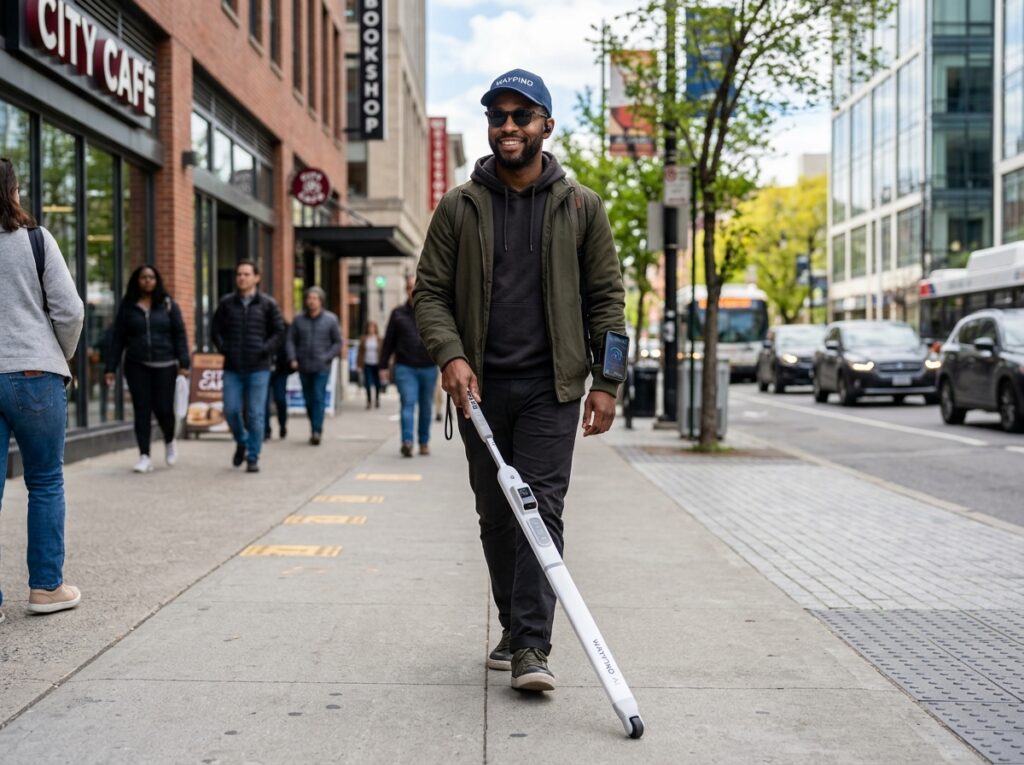
The white cane has been a symbol of independence for the blind community for a century. It is dependable, lightweight, and universally understood. But it has one limitation that no amount of technique can fully overcome: it only tells you what is directly in front of you, and only after you have already contacted it. Stanford University researchers decided that was not good enough — and built something better for $400. The Stanford Augmented Cane is a self-navigating robotic cane developed by researchers at the Stanford Intelligent Systems Laboratory. It has been making rounds again in the accessible technology community this July as awareness of the device continues to grow — and for good reason. This is the kind of innovation that the Paschall Power Newsletter exists to spotlight: practical, affordable, and genuinely life changing.
What Makes This Cane Different
Most sensor canes on the market are either technologically limited — detecting only what is immediately in front of the user — or prohibitively expensive, with some research models weighing up to fifty pounds and costing around $6,000. The Stanford Augmented Cane changes that equation entirely.
Weighing just three pounds, the cane is equipped with a LIDAR sensor — the same laser-based distance measurement technology used in self-driving cars — along with GPS, accelerometers, magnetometers, and gyroscopes. Together, these sensors give the cane a real-time, three-dimensional understanding of the environment around the user, not just what is directly underfoot.
The cane uses artificial intelligence algorithms borrowed from robotics and autonomous vehicle research — including simultaneous localization and mapping (SLAM) to build a live map of the surrounding space, identify obstacles, determine what those obstacles are, and then guide the user around them. It does not just detect a wall. It understands the wall, plots a path around it, and steers you there.
“We wanted something more user-friendly than just a white cane with sensors,” said Patrick Slade, lead researcher, and graduate research assistant at the Stanford Intelligent Systems Laboratory. “Something that cannot only tell you there’s an object in your way but tell you what that object is and then help you navigate around it.”
Built for Real Life — Indoors and Out
One of the most significant aspects of the Stanford Augmented Cane is that it works in both indoor and outdoor environments. Navigating a grocery store, a hospital corridor, a busy sidewalk, or an unfamiliar office building — the cane manages all of it using the same sensor suite and AI navigation system.
Key capabilities briefly:
- LIDAR obstacle detection — identifies objects before contact, not after
- Object identification — the cane can tell you what is in your path, not just that something is there
- Route following — guides users along planned paths both indoors and outdoors
- GPS and motion sensors — tracks position, speed, and direction in real time
- Lightweight at 3 pounds — practical for daily use, not a laboratory prototype
- Open-source software — the full parts list and build instructions are publicly available
The $400 Price Point Changes Everything
Accessibility technology has a long history of being priced out of reach for the people who need it most. The Stanford team made affordability a core design requirement, not an afterthought. The cane can be built from off-the-shelf components using free, open-source software, with a complete parts list and DIY assembly instructions published alongside the research. At $400, this device is within reach for individuals, schools, rehabilitation centers, and organizations serving the blind community. For context, comparable research-grade sensor canes have historically cost up to $6,000. The Stanford team cut that price by 93 percent without sacrificing capability. The research was published in the journal Science Robotics under the title “Multimodal Sensing and Intuitive Steering Assistance Improve Navigation and Mobility for People with Impaired Vision.” The researchers designed the cane with the more than 250 million people worldwide living with impaired vision in mind — a number that underscores just how significant an affordable solution could be.
- Activate the following link for more about the Stanford Augmented Cane💡
Stanford Researchers Build $400 Self-Navigating Smart Cane — Stanford HAI
Flying with Confidence: ReBokeh Brings Low Vision Navigation to BWI Airport
Paschall Power Newsletter — Travel & Accessibility Feature

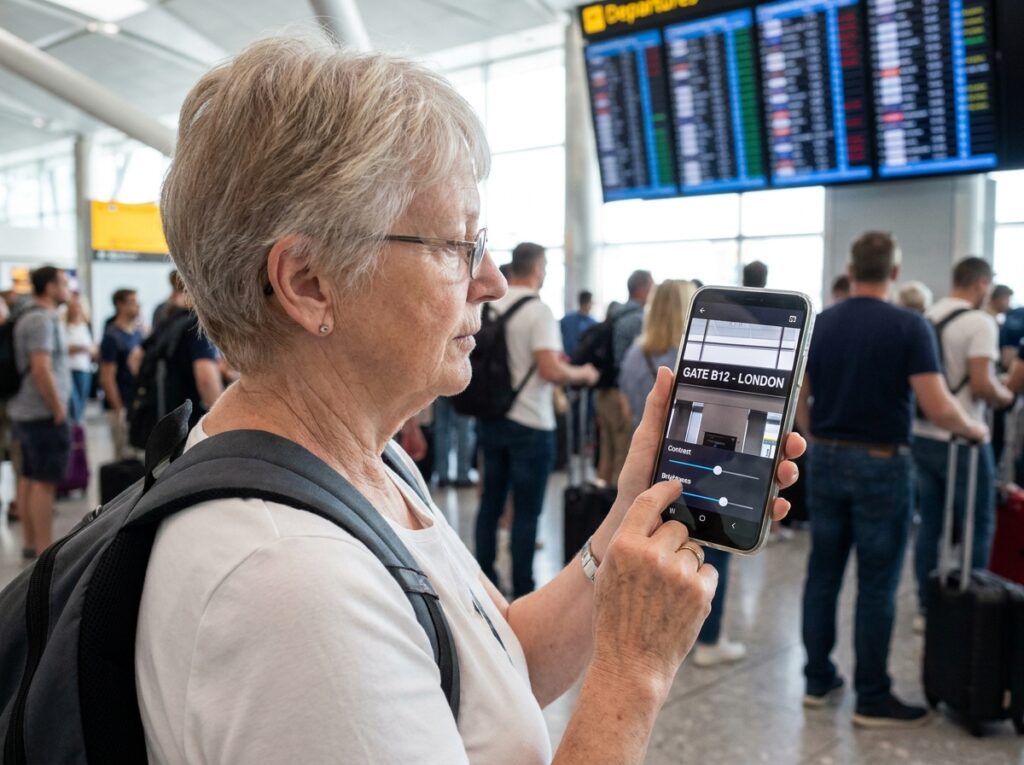
Airports are among the most visually demanding environments in modern life. Departure boards, gate signs, wayfinding arrows, restaurant menus, security lane markers — every piece of critical information is delivered visually, at a distance, often in small print, and frequently changing. For the 90 percent of blind and low vision individuals who retain some functional sight, navigating an airport has long meant either relying on assistance from strangers or simply hoping for the best. Baltimore/Washington International Thurgood Marshall Airport — BWI Marshall — decided to change that. In April 2026, BWI became the first airport in the Mid-Atlantic and only the second airport worldwide to offer free, unlimited access to ReBokeh Vision Technologies, a mobile app designed specifically for the low vision community. The Paschall Power Newsletter team considers this one of the most practical accessibility wins of the year — because it meets travelers exactly where they are.
What ReBokeh Does — and Why It Matters
ReBokeh is not a screen reader, and it is not an AI image describer. It is something different and, for many low vision users, more immediately useful: a real-time visual enhancement tool. The app uses your smartphone’s live camera feed and overlays customizable filters that adjust contrast, color hue, zoom level, and lighting — in real time, as you move through a space.
The key insight behind ReBokeh is that most low vision individuals do not need the world described to them — they need the world adjusted for them. A departure board that is unreadable at normal contrast becomes clear with a high-contrast filter. A gate sign that disappears in glare becomes visible with adjusted lighting. ReBokeh empowers users to make use of the functional vision they already have, rather than replacing it entirely.
At BWI Marshall, travelers with low vision can use ReBokeh to:
- Read gate and wayfinding signs throughout the terminal
- View arrival and departure boards with customized contrast and zoom
- Locate restaurants, shops, and airport lounges independently
- Translate signage and on-screen information in real time across multiple languages
- Navigate security lanes and boarding areas with greater confidence and independence
Built by the Low Vision Community, for the Low Vision Community
ReBokeh was founded in 2019 by Rebecca Rosenberg, a low vision traveler who flies dozens of times per year and built the app out of her own lived experience navigating airports and public spaces. That origin matters. ReBokeh is not a product designed by sighted engineers imagining what low vision users might need — it is a product designed by someone who lives it every day. “As a low vision traveler who flies dozens of times per year, I know how important it is to feel confident and comfortable while navigating a busy airport,” said Rosenberg. “We’re incredibly proud that BWI Marshall — our local airport — is leading the way in creating a more accessible and enjoyable experience for low vision travelers.” The app is free to download and use at BWI Marshall. It automatically aligns with a user’s existing device settings, requires no special hardware, and works on standard iOS and Android smartphones. For travelers who already carry their phone everywhere, ReBokeh adds a powerful layer of visual independence without adding anything to your bag.
What This Means for the Future of Accessible Travel
BWI Marshall is only the second airport in the world to offer this technology. That means the door is wide open for other airports, transit hubs, train stations, and public venues to follow. The Paschall Power Newsletter team will be watching to see which airports step up next — and we encourage our readers who travel to ask their home airports about accessibility technology partnerships. Independent travel is not a luxury. It is a right. And tools like ReBokeh are proving that the technology to make it real already exists — it just needs to be deployed.
- Activate the following link for more about ReBokeh at BWI Marshall Airport💡
BWI Marshall Airport Expands Accessibility for Low-Vision Travelers — BWI Airport
- Activate the following link to learn more about ReBokeh Vision Technologies💡
ReBokeh Vision Technologies — rebokeh.com
The Monarch 1.4 Update: Braille Gets Smarter, More Connected, and More Powerful
Paschall Power Newsletter — Education, Braille & Daily Living Feature

Braille is not a relic. It is a living, evolving language of independence — and the American Printing House for the Blind is making sure it keeps pace with the digital world. The APH Monarch is a portable tactile computer that renders both braille text and tactile graphics on the same device — and its latest update, Version 1.4, released in early 2026, has been generating significant conversation in the blind education and professional community throughout July. For the Paschall Power Newsletter team, the Monarch represents something important: a device that treats braille not as a workaround, but as a first-class way to engage with the digital world. Version 1.4 takes that vision further than any previous release.
What Is the Monarch?
The Monarch is a laptop-style tactile computer built specifically for blind and low vision users. Unlike a standard braille display, which only shows text, the Monarch renders both braille and tactile graphics — maps, diagrams, charts, illustrations — on the same refreshable surface. This means a student can read a science textbook and feel the diagram of a cell on the same device, at the same moment, without switching tools. The device gives users fast access to downloadable digital textbooks and a massive free content library through APH’s Tactile Graphics Image Library (TGIL). It is supported by specialized customer support, customized training, webinars, firsthand demonstrations, and an active Monarch Users Group — a full ecosystem, not just a piece of hardware.
What’s New in Version 1.4
The 1.4 update focuses on three areas that users have been requesting since the device launched: cloud connectivity, wireless braille terminal support, and improved reading performance.
- KeyDrive — Cloud File Access: One of the most requested features since launch, KeyDrive allows users to connect directly to Google Drive or OneDrive from the Monarch. Cloud accounts appear alongside local storage, making it easy to open, move, and manage files in one place. For students and professionals who work across multiple devices, this is a significant quality-of-life improvement.
- Bluetooth Braille Terminal: Version 1.3 introduced braille terminal support, allowing the Monarch to function as a multiline braille display for screen readers like JAWS and NVDA. Version 1.4 expands this to Bluetooth, cutting the cable requirement and making it far easier to incorporate the Monarch into everyday computing setups. Users are already using this for live notetaking, coding, and presenting.
- Improved eBraille Reading Performance: Meaningful improvements to eBraille reading speed and formatting make longer reading sessions smoother and more comfortable. For students working through textbooks or professionals reading lengthy documents, this matters in practice.
- Expanded Language Support: Additional language support broadens the Monarch’s reach to more users across different linguistic communities, reinforcing APH’s commitment to global accessibility.
The Monarch Student Pilot Project
APH is currently running the Monarch Student Pilot Project (MSPP), which grants select students in grades 1 through 12 across the United States and its territories access to the Monarch device. The goal is to observe the educational impact on student outcomes and use that data to further develop the device’s potential in classroom settings. There is also the Monarch RISE Project, focused on employment — helping blind and low vision professionals use the Monarch in workplace settings for tasks like live notetaking, coding, and presenting. Early participants are already reporting meaningful improvements in how they engage with workplace technology. The Monarch is not just a device for students. It is a device for anyone who reads, works, or learns — and who deserves to do so in braille, with the same access to digital content that sighted users take for granted.
- Activate the following link for more about the APH Monarch💡
Discover Monarch — American Printing House for the Blind
- Activate the following link for the Monarch 1.4 update details💡
Monarch 1.4: New Ways to Read, Connect, and Work — APH Blog
Paschall Power Star of the Month — August 2026
Dr. Lloyd B. Williams — The Man Who Gives Sight Back to the World
Paschall Power Newsletter — August 2026 Honoree
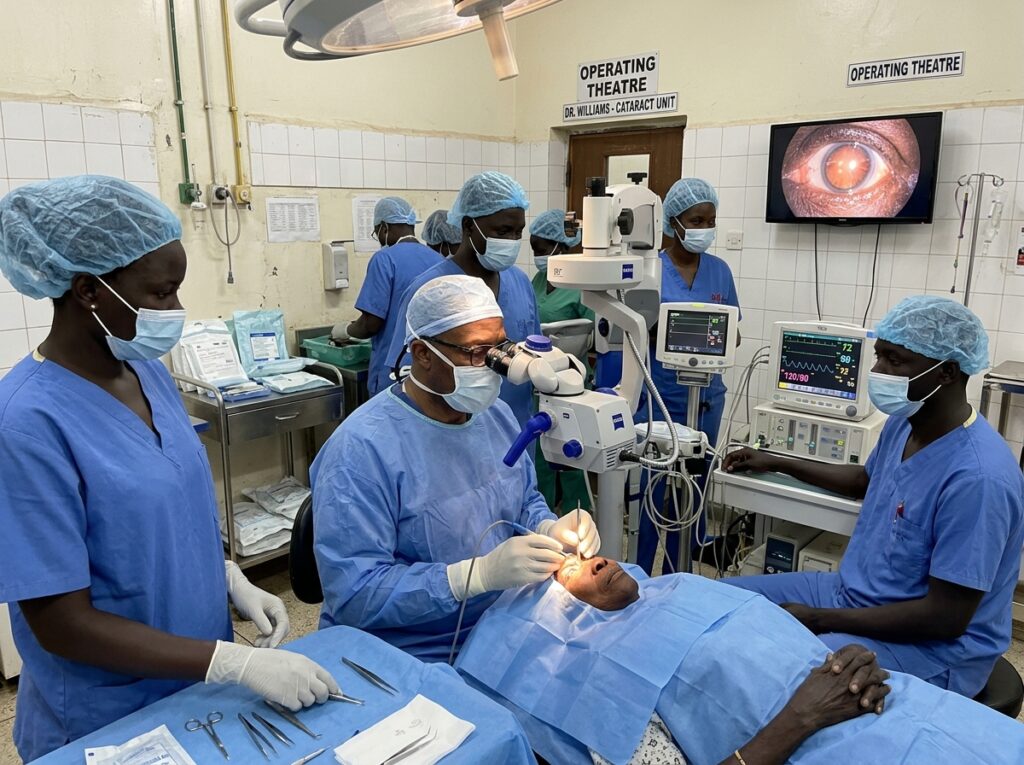
We have reached the conclusion of our 33rd edition — and you know what that means. It is time to honor the Paschall Power Star of the Month for August 2026. This month, we celebrate a man whose life’s work is the most direct response to blindness: he walks into operating rooms in some of the most underserved places on earth and gives people their sight back. One surgery at a time. Hundreds per trip. Thousands per year.
The Paschall Power Newsletter is proud to honor Dr. Lloyd B. Williams, MD, PhD — Associate Professor of Ophthalmology at Duke University, Director of Duke Global Ophthalmology, and one of the most consequential figures in the global fight against preventable blindness.
Background: From Duke University to the Operating Rooms of South Sudan
Dr. Williams earned his medical degree and doctorate from Duke University, one of the nation’s premier academic medical institutions, and built his career as a cornea specialist and ophthalmologist within the Duke University health system. He currently serves as Associate Professor of Ophthalmology, Director of Duke Global Ophthalmology — known as Duke GO — and affiliate of the Duke Global Health Institute.
Since 2008, Dr. Williams has devoted himself to global ophthalmology, traveling to underserved regions across Africa, Central America, Indonesia, and beyond to perform cataract surgeries and corneal transplants for people who would otherwise have no access to eye care. He works in partnership with the Cure Blindness Project, a global organization dedicated to eradicating avoidable blindness, and has become one of its most recognized volunteer ophthalmologists.
South Sudan: The Region with the Highest Rate of Blindness in the World
South Sudan is not just a place where blindness is common. According to the United Nations Office for the Coordination of Humanitarian Affairs, South Sudan has one of the highest rates of blindness in the world. Years of conflict have left the country’s eleven million people with little to no access to eye care. There are almost no ophthalmologists. There are almost no surgical facilities equipped to perform even basic procedures. And yet, the leading cause of blindness in the region is cataracts — a condition that is entirely treatable with a surgery that takes less than 20 minutes and costs $25 to $30 per person in low-income country settings.
Let that sink in for a moment. Thousands of people in South Sudan are blind — not because their condition is incurable, not because medicine has no answer — but because no one has been there to perform a $30 surgery. Dr. Williams goes there. He has been going there for two decades.
The Surgical Boot Camps: 2,000 Surgeries in 10 Days
Dr. Williams and his teams conduct what they call surgical boot camps — intensive outreach missions where they perform as many as 1,000 to 2,000 surgeries in a single 10-day trip. People walk from as far as forty miles away to reach the surgical sites. Some arrive in wheelbarrows. Many are led by a stick. They come because they have heard that someone is there who can give them their sight back.
“For the most part, I don’t even get up. I just sit and do surgery. Next, do surgery. Next, do surgery,” Dr. Williams told NBC News during a feature on his work in South Sudan.
The results are immediate and profound. Bandages come off in the morning after surgery. A five-year-old, confused by the sudden brightness of the world, searches the room until he finds his mother’s face. A woman sees her adult son for the first time in five years. Three siblings — each blind for most of their childhood — see each other clearly for the first time. The youngest had never seen his mother. When her voice reached him, he walked straight into her arms.
“When I first saw it happen, I thought I could do this for the rest of my life and never feel like I wasted a minute,” Dr. Williams said.
Beyond Surgery: Building Systems That Last
What makes Dr. Williams’ work exceptional is not just the volume of surgeries he performs — it is his understanding that lasting change requires building local capacity. He does not simply arrive, operate, and leave. He trains local surgeons, ophthalmologists, and ophthalmic nurses so that communities can sustain high-quality eye care long after his visits.
Highlights of his broader impact:
- In 2021, Dr. Williams performed Sierra Leone’s first-ever corneal transplant — a milestone in that country’s medical history
- In Indonesia, his training initiative resulted in approximately fifty corneal transplants and the establishment of an eye bank at Sardjito Hospital in Yogyakarta in 2024
- His work with the Health in Sight Mission in Honduras has served more than 150,000 residents of Roatan
- In July 2025, Duke launched its first Global Ophthalmology Fellowship, preparing the next generation of surgeons to carry this mission forward
- In 2025, he received the American Academy of Ophthalmology’s Outstanding Humanitarian Service Award — one of the highest honors in his field
The USAID Cuts: A Devastating Blow to Global Eye Care
The work of Dr. Williams and organizations like the Cure Blindness Project does not happen in isolation. For decades, the United States Agency for International Development — USAID — served as the backbone of global humanitarian health programs, funding education, health care, food security, and vital life resources for underprivileged nations around the world. USAID was not just a government agency. For millions of people in places like South Sudan, it was the difference between access and abandonment. In January 2025, the Trump administration announced a 90-day freeze on all U.S. foreign aid. By July 2025, that freeze became a permanent shutdown of USAID. Research published in BMJ Public Health in July 2026, conducted by Columbia University’s Mailman School of Public Health, documented the consequences: immediate disruptions to health and humanitarian systems worldwide, with disproportionate impacts on women, girls, and other marginalized populations. Health workers lost their jobs. Referral networks collapsed. Communities that had made hard-won gains in health outcomes saw that progress reversed overnight. “The abrupt termination of foreign aid in 2025 was a systems-level shock that exposed structural weaknesses in global health financing and governance,” said Sarah Branoff, MPH, lead author of the Columbia study. For the blind community in South Sudan and across the developing world, the loss of USAID funding means fewer surgical outreaches, fewer trained local surgeons, fewer supplies, and fewer people who will ever have their bandages removed the morning after a $30 surgery that changed everything. The Paschall Power Newsletter team believes this is a story our community must know — because blindness is not just a personal experience. It is shaped by policy, by funding, and by the decisions made in rooms far from the people they affect.
- Activate the following link for more about Dr. Lloyd Williams and Duke Global Ophthalmology💡
Duke Global Ophthalmology — Duke Eye Center
- Activate the following link for the Cure Blindness Project South Sudan outreach💡
Cure Blindness Project — South Sudan
Stay Connected, Share, and Support
On behalf of the Paschall Power Newsletter team, thank you for reading. Do you have questions, suggestions for future content, or interest in submitting an article for a future release? Drop us a line at the contact link below:
- Contact us💡
Contact Us — accessiblepass.net
Consider Donating
The (Paschall Power Newsletter) team sincerely thanks and appreciates all donations that help keep this work moving forward. “Growth occurs through individual effort, community support, and the generosity of those with integrity and power.” Please activate the link below for our donation page:
- Consider Donating💡
Consider Donating — accessiblepass.net
Written by the Paschall Power Newsletter Team